22Depending on the number of files, comparing two folders can be a really time consuming task to do.
Beyond Compare attempts to make the process easier.
And its not just the contents of folders that it can compare.
Features and Highlights
Beyond Compare can be installed for all existing users or only current user.
It can be used as a portable software as well.
The option to make it portable is available when you are running the installer.

The context menu is supposed to make it easier to compare files and folders.
When you right-punch a folder (or a file) in File Explorer, a new command appears.
It is called Select Left Folder for Compare.
At this point, nothing happens yet.
To launch Beyond Compare, you have to choose another folder.
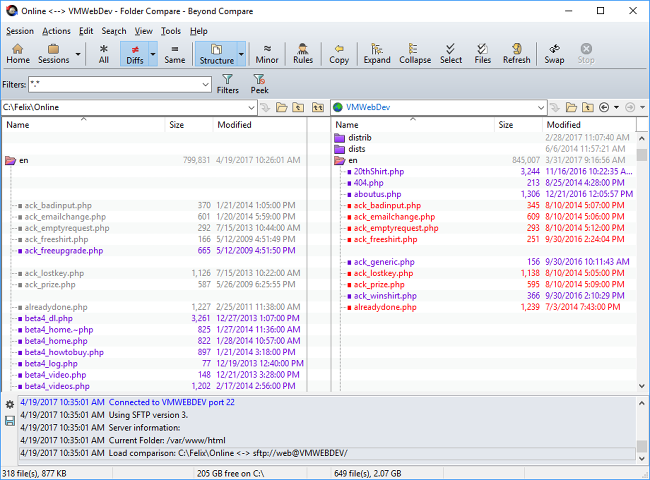
Clicking the All button will show all of the files within the two folders.
Clicking the drop arrow of the Diffs button will reveal more options to compare files.
If you want to find out immediately which files that are missing on either side, click Show Orphans.
After you choose the most suitable way to compare the files, you could delete the unnecessary files.
