Without pressing a button, you cannot continue.
These are called popups with callback action.
However, this window can easily go in the background without you noticing it.
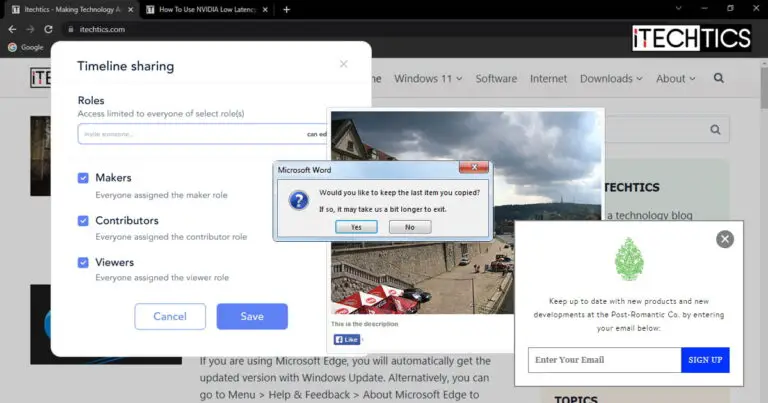
These are just two examples of the different types of windows and snippets you encounter on a daily basis.
There are also other kinds.
Right now, we are discussing the Pop Up that usually appears on a website.

It usually contains marketing material and ads that the user did not initiate.
These are not limited to ads only.
These often appear automatically on a landing page as soon as the page loads.

Additionally, they usually do not blur the background and can be easily dismissed by closing them.
This is usually dependent on the developer.
Pop Ups have been widely overtaken by modals due to their distracting nature that defocuses the user/clients.

Modals
Modals are often confused with Pop Ups but are different.
Modals open within the same window and therefore become the primary focus for the user.
These are usually designed by the web developer, therefore mostly have the same theme as the website.

Modals are usually initiated by the users and include workflows.
We would also like to add that Modals are slowly replacing Pop Ups.
This means that Modals now also include similar content to Pop Ups, like sign-in and subscription call-to-action buttons.

Lightbox/Theatre
The words Lightbox and Theatre occasionally g hand-in-hand, as they are the same thing.
A Lightbox is an enlarged image a user clicks to view in detail.
This is a Lightbox.

A Lightbox has different purposes as opposed to a Pop Up and a Modal.
Popover
A Popover is a miniature pop-up that appears on top of another object.
Every app, program, surfing app, etc.
has a window it opens in.
A window is a frame in which any content appears.
Tab
A tab is more or less like a new page inside an existing window.
The best way to understand the concept of tabs would be to look at your web online window.
Moreover, Microsoft has also incorporated the tabbed system on the command lines, like the Command Prompt.
This shows us that the tabbed system may be the future of quick multitasking across all apps and programs.
Dialog Box
A dialog box is mostly used for operating systems and not web browsers and apps.
It is a prompt to intimate the user about something and may or may not include any actionable content.
For example, you may be asked to choose from an option whether to restart now or restart later.
This confusion normally arises between website developers as this is where both of them are used frequently.
Of course, a Pop Up is not recommended when the user wants to preview an image.
Closing Thoughts
Every window, small or large, serves a different purpose.
Talk to us straight and get your questions answered right away
source: www.itechtics.com
