Table of Contents
On This Page
What is DVI?
DVI eliminates outdated analog video systems and sends uncompressed data for interactive visuals on certain displays.
With its revolutionary technology, DVI is ushering in an era of faster response times and higher-quality images.
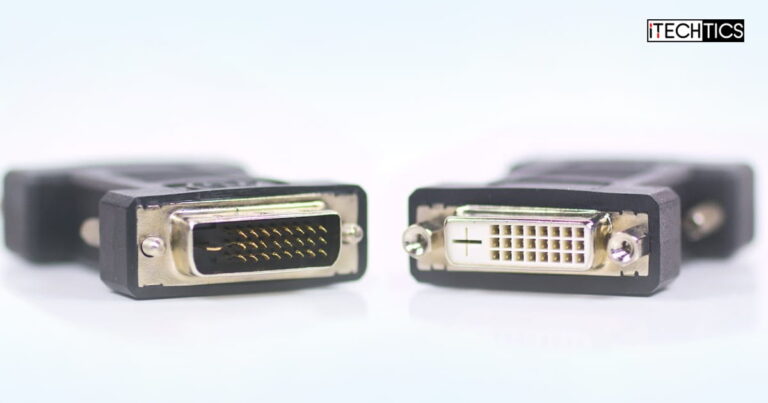
DVI cables offer high resolution and image quality.
They also offer more convenience as these cables can be easily hotplugged anywhere.
This contrasts with analog systems that suffer electric attenuation and noise interference while transferring images.

Single-link vs. Dual-link DVI- I (Female)
This is where DVI comes into play and prevents such interference with ease.
On top of its impeccable accuracy, this technology also offers a significant reduction in power consumption.
DVI is compatible with modern multimedia interfaces known as HDMI.

DVI-A (Female)
Not only is it outdated technology, but it also lacks the capability of transmitting audio signals.
Its maximumresolutioncapabilities distinguish each one and the number of pins used.
Dual-Link connectors are fully compatible with Single-Link, but the opposite is not true.

DVI-D (Female)
Apart from the two significant types of DVI cables, they can also have different connector types.
These are available in three types discussed below.
Note that the DVI-D and DVI-I connectors come in both dual-link and single-link configurations.

DVI-I (Female)
These cables offer a straightforward way to transmit data in an analog form, facilitating seamless communication between devices.
A single-link DVI-A connector is composed of 17 pins (12+5) and supports only analog signals.
However, the scarcity of DVI-A cables is a downside to this connector.

Their compatibility with DVI-D and DVI-I connector varieties makes them an excellent choice for most monitors.
Single-Link DVI-D connectors come equipped with 19 pins, while Dual Link connectors have 25.
They are compatible with video cards and enable connections to both DVI digital screens and analog VGA monitors.

Single-Link DVI-I connectors have 23 pins, with 18 dedicated to digital signals and five for analog.
Meanwhile, Dual-Link connectors have 29 pins, with 24 for digital signals and an additional five for analog.
Which DVI Cable to Use?

When selecting the ideal DVI cable for your gear, its essential to get it right from the start.
of Pins1723291925Type of DataAnalogAnalog + DigitalAnalog + DigitalDigitalDigitalBitrate4.95 Gbps9.9 Gbps4.59 Gbps9.9 GbpsMax.
DVI cables are widely sought after by those in the world of video card production.

Most recent models have at least one or two DVI output ports.
The digital realm now advocates the HDMI interface due to its delivery of first-class media.
This explains why DVI is so exclusive in technology.

Frequently Asked Questions (FAQs)
What bandwidth data capabilities does a DVI connection have?
How long does an average DVI cable typically measure?
When using a digital signal, the maximum length of a DVI cable is 15 meters.

What is the cable bandwidth of DVI?
If you want a dual-link performance, the advanced version of DVI-I Dual Link is perfect for your needs.
0
Get weekly insights, tips and exclusive content delivered straight to your inbox.
Talk to us straight and get your questions answered right away
source: www.itechtics.com
