yo note that the keyboard is simply a keyboard and stand nothing more.
Even so, their position remains roughly equivalent to a standard keyboard.
I think most users will find the keyboard easy to adjust to.
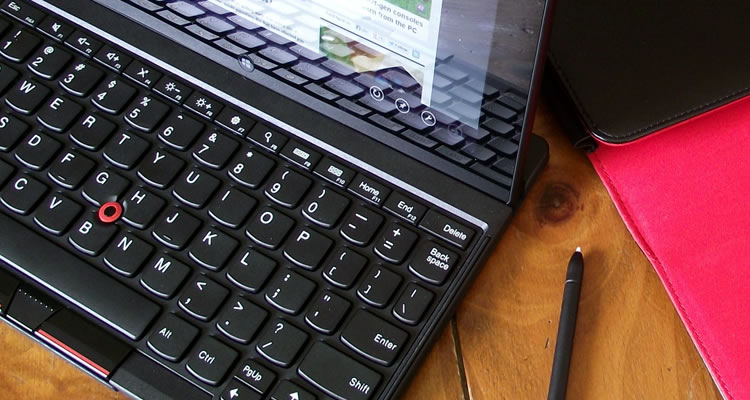
Unlike traditional nubs though, this one doesn’t actually work like a joystick.
Rather, it’s equipped with a touch sensor which translates your finger swipes to cursor movements.
Admittedly, I found this pointing gear clumsy and perhaps even confusing a touchable joystick?
I routinely preferred my finger even the stylus when appropriate.
Lenovo describes the keyboard accessory (EBK-209A) as a “stand”.
While that may be technically true, it certainly fares better as a keyboard than it does a stand.
Meanwhile, the brunt of the tablet rests precariously against a less-than-sturdy plastic kickstand.
It doesn’t lock or snap into place it just kind of sits there.
Now, it should be said the system works well enough on a solid, level surface (i.e.
desk) but I found the lack of any tilt adjustment headache-inducing.
Its no-slip rubber feet and stabilizing rear heel are ideal features for solid surfaces.
For use anywhere else though (e.g.
lap), I found the experience harrowing.
The tablet weighs significantly more than the keyboard, making it top heavy and prone to fall backwards.
Pairing was as simple as Bluetooth pairing can get and the battery life was plentiful.
The keyboard survived two four-hour news writing sessions and week-long trip out of town before needing a charge.
Additionally, the stylus and its unique ThinkPad-esque look and feel sets it apart from the competition.
There is no shortage of input options here: a Bluetooth keyboard, pointer nub, touchscreen and stylus.
The keyboard is top notch.
The ThinkPad 2’s performance and specs are so-so, but plenty adequate for most typical tablet uses.
Cons:Clover Trail processor already feels dated.
not your lap).
