Written by Clifford
In this article, we provide an overview of the OpenStack open source cloud computing environment.
Introducing OpenStack
OpenStack is becoming the standard open source cloud hosting software.
Lots of companies are using it.
It is designed to deploy one or two virtual machine or hundreds or thousands of them.
This is called bare-metal.
The new release of OpenStack, called Kilo, has just shipped.
OpenStack optionally ships with Ubuntu and Redhat, showing how popular it has become.
Among its many contributing developers are Microsoft and VMware.
you could also deploy OpenStack to bare metal machines.
Below we go into detail about this.
OpenStack has no GUI, or not really.
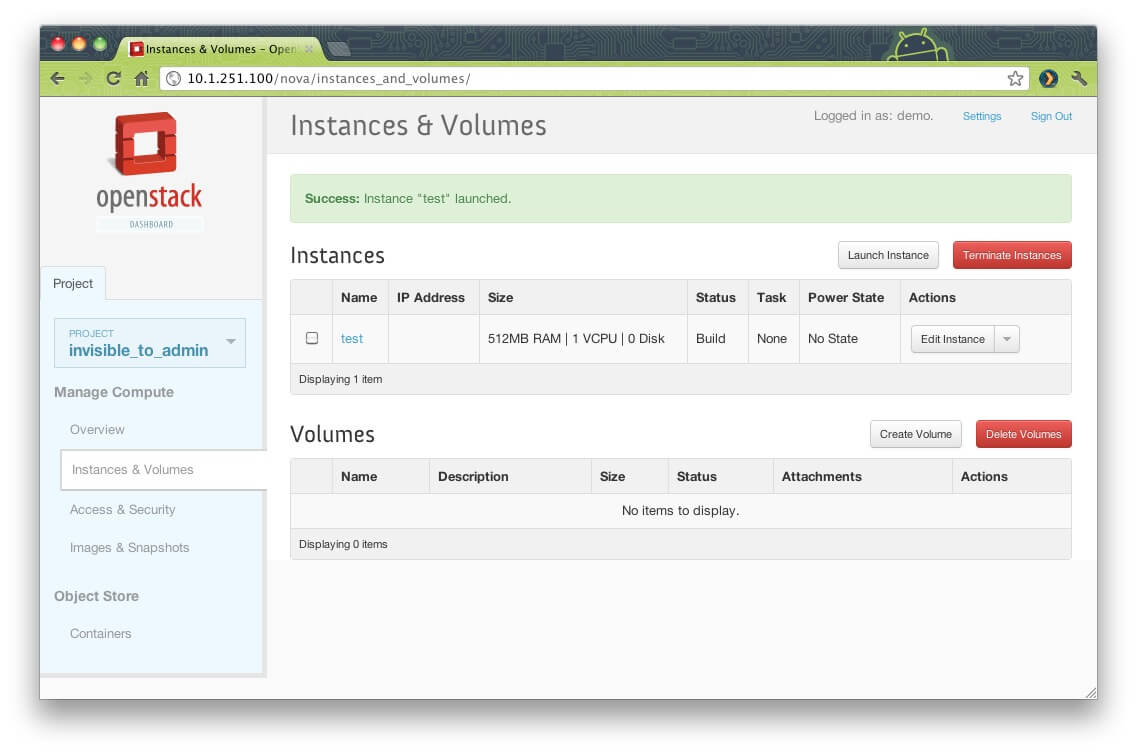
Its really just a set of APIs with a basic Dashboard giving a visual view into your deployed Infrastructure.
you could program OpenStack using Python or use its command-line tools.
The OpenStack system itself is written in Python.
The OpenStack Python SDK ishere.
Below we discuss most of the major features of OpenStack.
This introductory article should then lead you to other articles and videos for further details and additional study resources.
OpenStack Architecture
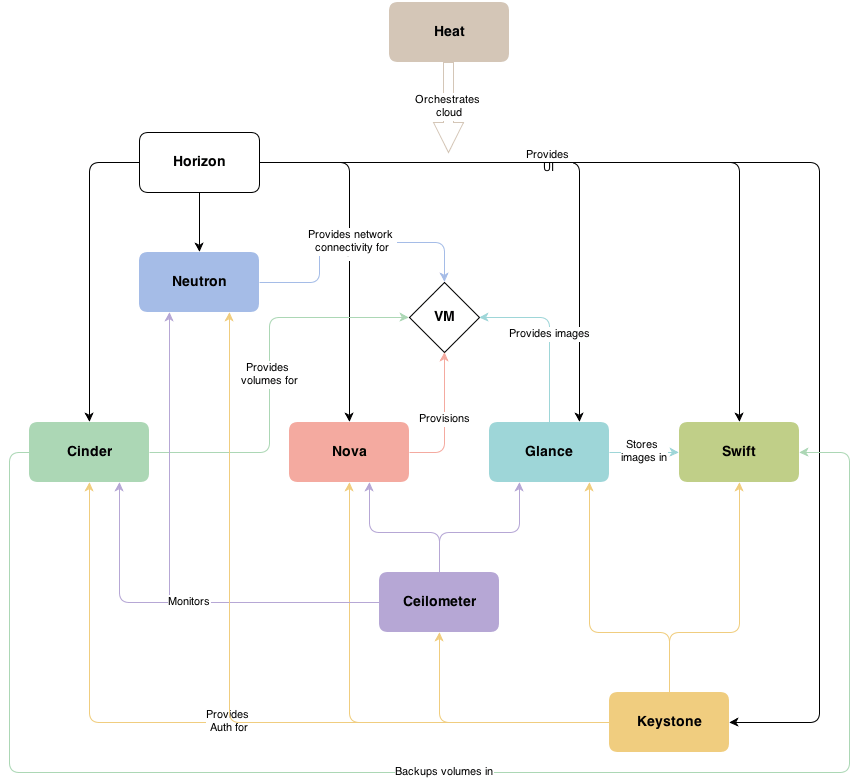
The diagram below from OpenStack give an overview of the entire system.
Below we explain some of the modules (called projects and nodes).
In sum:
There are additional nodes too, for example a database node.
Nova: Compute
Each part of the OpenStack system has its own icon.
Above is the one for Compute.
it’s possible for you to think of Compute as the piece that provisions virtual machines.
Working with OpenStack
You interact with OpenStack through its APIs or the command line.
The command line for Compute is Nova.
Here is a sample command:
This registers a node with the ironic service.
Ironic is part of Computer.
We send it a JSON object since that is what its API requires.
Keystone returns the response also in JSON format.
The user login (token) is inside the JSON object.
These messages are transmitted to the servers using messaging software like RabbitMQ.
Each of the OpenStack projects are divided into components.
For example, Compute includes:
Ironic: Bare Metal Provisioning
Ironic is part of Compute.
OpenStack Computer can start a server and install a hypervisor directly on an empty computer.
This means that it can make bios parameters, such as changing the boot machine order.
It uses PXE boot and IMPI to work with the machine.
As you know, there are lots of ways to set up a Hypervisor.
you might install an operating system and then put a hypervisor on top of that.
Or you could do it the other way around.
Ironic does all of this.
Supported Hypervisors
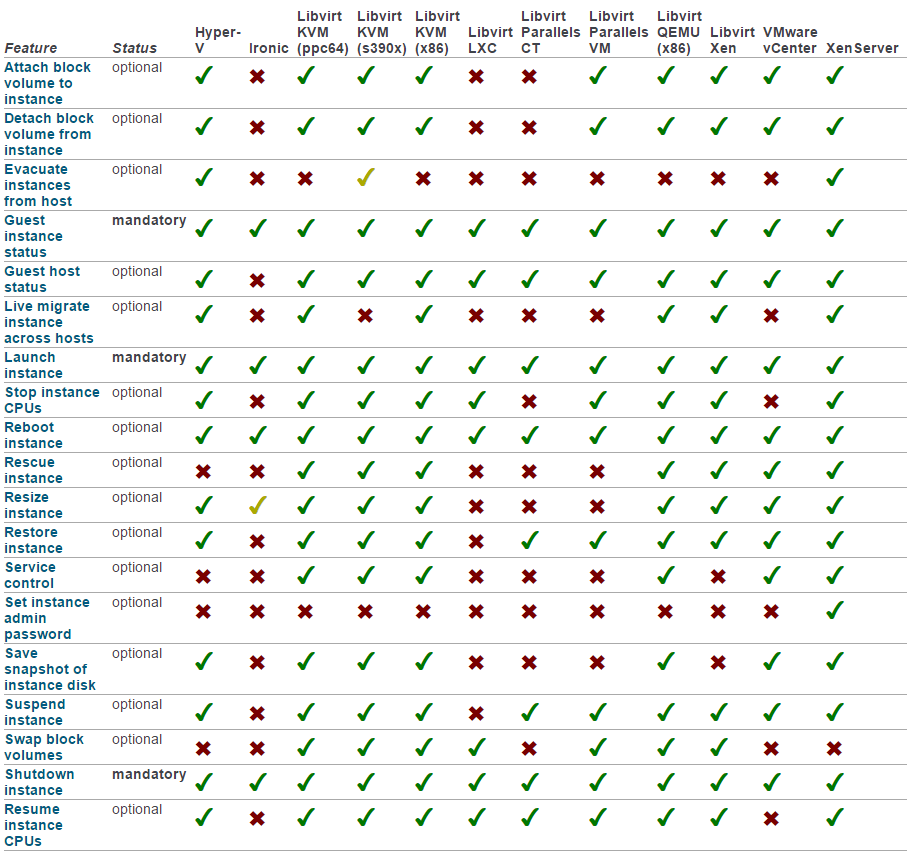
Look at this graphic of functions supported for each Hypervisor.
(The whole list will not fit on the page.)
This list is a good way to understand what OpenStack Compute does.
Swift: Object Storage
Swift provides object storage for OpenStack.
So Swift does what Amazon S3 does.
And like Amazon S3, you interact with it using REST APIs.
Objects stored in object storage cannot be updated; they can only be added and deleted.
(An object can be replaced by deleting one and adding another on top of it.)
Each file in object storage has an object id.
Disks are divided into blocks with traditional and modern disk storage systems.
It also uses REST to query VM images.
Images can be stored in traditional hierarchical file systems or object storage.
Here is a sample command-line command.
It includes a directory like LDAP.
Celiometer: Metering
You cannot give your customers virtual machines for free.
So Celiometer keeps track of machine usage so you’re able to charge your clients.
Neutron: Networking
Neutro, as the name suggests, create networks.
It creates subnets, routers, gateways, and assigns IP address.
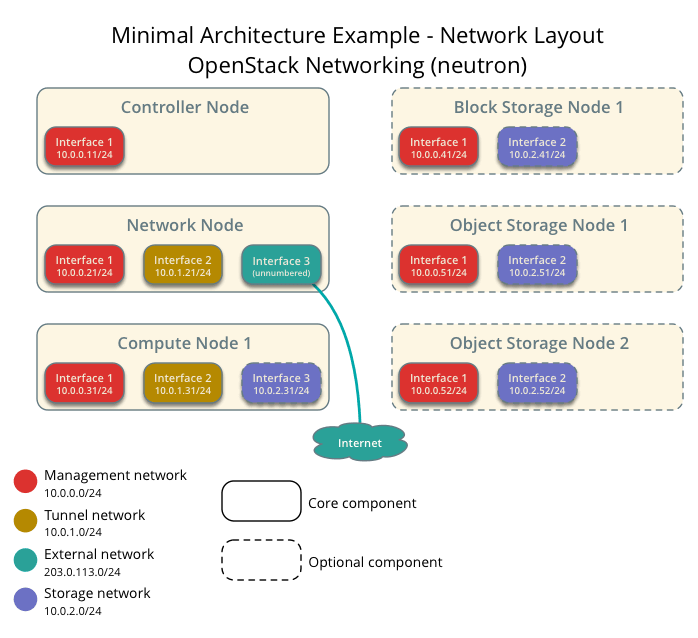
Here is a sample configuration.
Block and object storage nodes are being created in this sample OpenStack environment.
Another way to understand OpenStack is by looking at the different items in each project.
So we list those items here.
Developer can extend the dashboard as well to, for example, add custom panels.
you’re free to also brand it, adding your companys logo and screen colors for users.
And then there are third party modules you could add in.
Neutron is what lets you set up internet access and subnets for each of your customers.
Horizon gives you a dashboard view into the systems you have built.
Keystone provides a single point of authentication to work with the other nodes.
Cellometer provides the data you need for customer billing.
As you’re free to see, OpenStack is quite a large and complicated system.
