What Is System Volume Information Folder In Windows?
If we take a brief look at our Windows installation drive, we will find lots of system folders.
We are talking about the folders that are present on the drive where Windows have been installed.
Well, normally this is a hidden folder which doesnt show up on its own.
Users need to initiate the Show hidden and protected files under the folder option.
However, have you ever wondered what exactly is System Volume Information folder and why its hidden?

Also Read:What Is Runtime Broker (runtimebroker.exe) Doing On My Computer?
What isSystemVolume Information Folder?
The reason why the System Volume Information Folder is hidden is that its used by Windows for system-level functions.
Thats the most probable reason why the folder is hidden and you cant access it.
Another interesting thing is on NTFS-Formatted drives, you cant delete the folder.
Also Read:What Is Windows Logon app (winlogon.exe) Doing On My Computer?

The System Volume Information Folder is Very Large, how to fix it?
Since the folder is used to store the information and restore point generated by Windows System Restore tool.
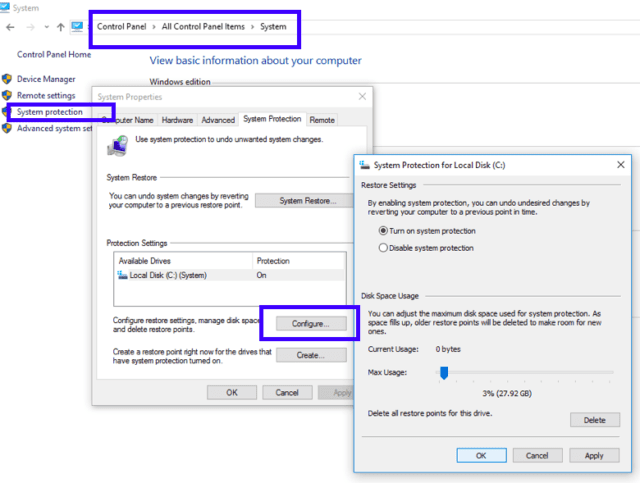
The best option to shrink the folder is to suspend the System Restore option.

For that, head to the System and Security option in Control Option.
There, you gotta find the System option and open it.
Now, find System protection option and then check whether the System Restore option is enabled or disabled.

So, should I delete the System Volume Information Folder?
As we have already mentioned above, in NTFS-Formatted drives, you cant delete the folder.
However, the better option is to leave the folder as it is.
Share your views in the comment box below.
